
Onboarding animation and role-based training that shows new hires what correct looks like
You’ll talk to a learning designer about one specific role. No deck required.
We build the onboarding animation, interactive practice, and visual job aids that make correct performance visible in week one, before the wrong habits form.
Built for L&D and HR leads in teams hiring across roles, where every new hire has to reach the same standard, whoever happens to train them.





New hires don't wait for clarity. They improvise, and the improvisation becomes the habit
Most organizations have onboarding materials: welcome documents, policy handbooks, tool walkthroughs, and shadowing schedules. The problem is rarely missing content.
The problem is what happens in the absence of clarity. When new hires don’t know exactly what correct looks like in the role, they don’t wait. They improvise. And improvised approaches that produce no immediate negative consequence quickly become habits.
Take one role you hire repeatedly. Multiply what that role produces per month at full productivity by the number of months a new hire currently takes to get there, then by how many people you hire into it each year. Most teams have never run that number. It is usually larger than the training budget being debated.
The window to establish correct behavior is the first week. When that window passes without clear guidance, the habits that form are much harder to correct later than they would have been to prevent.
What new hires are still unsure about after onboarding
- What the correct way to execute a workflow actually looks like, step by step
- Which shortcuts or workarounds are acceptable and which create downstream problems
- How their role connects to the people and processes around them
- What "good performance" looks like in the first 30, 60, or 90 days
What onboarding has to do, and whether a handbook, a shadowing week, or onboarding animation delivers it
The goal isn’t completing onboarding or finishing the orientation checklist. It’s whether new hires adopt correct workflows from the start, rather than building workarounds that compound into team-wide inconsistency.
Four things have to happen for that. Most teams already have something in place for each one. Here is what each does well as it is usually produced in-house, and where it runs out.
| F.Learning usually two of these, designed as one set | A written doc | Shadowing a senior | A slide deck or live walkthrough | A screen recording | |
|---|---|---|---|---|---|
| Shows what "right" looks like? | Strong: step by step, including the judgment behind it | Weak: they picture it themselves, with no way to check | Partly: only what comes up that week | Partly: once, at the presenter's pace | Partly: the clicks, not the judgment |
| Warns about common mistakes? | Strong: built from your real mistakes | Weak: rarely lists the wrong ways | Partly: if the senior remembers | Partly: depends on the presenter | Weak: almost never |
| Easy to look up mid-task? | Partly: through a job aid | Strong: best for quick lookups | Weak: can't be replayed | Partly: slides yes, demo no | Partly: hard to find the part |
| Same for every new hire? | Strong: one version for everyone | Strong: if someone keeps it current | Weak: depends who is free | Weak: varies by session | Strong: identical every time |
| Cheap to make and update? | Partly: higher upfront; a job aid updates fast like a document | Strong: cheapest, edits take minutes | Partly: free, but costs senior time | Partly: repeated every cohort | Partly: awkward to edit |
| Best when | many people, one workflow, mistakes are costly | mostly facts and policy to look up | judgment no document can capture | a small group with questions | a simple task inside software |
👈 Swipe horizontally to view full table 👉
In short: A written doc is strongest for quick lookups and cheapest to update. Shadowing is strongest where the judgment can’t be written down. F.Learning is strongest at showing what correct execution looks like, warning about the mistakes new hires actually make, and keeping the standard identical for everyone, and it costs the most to produce.
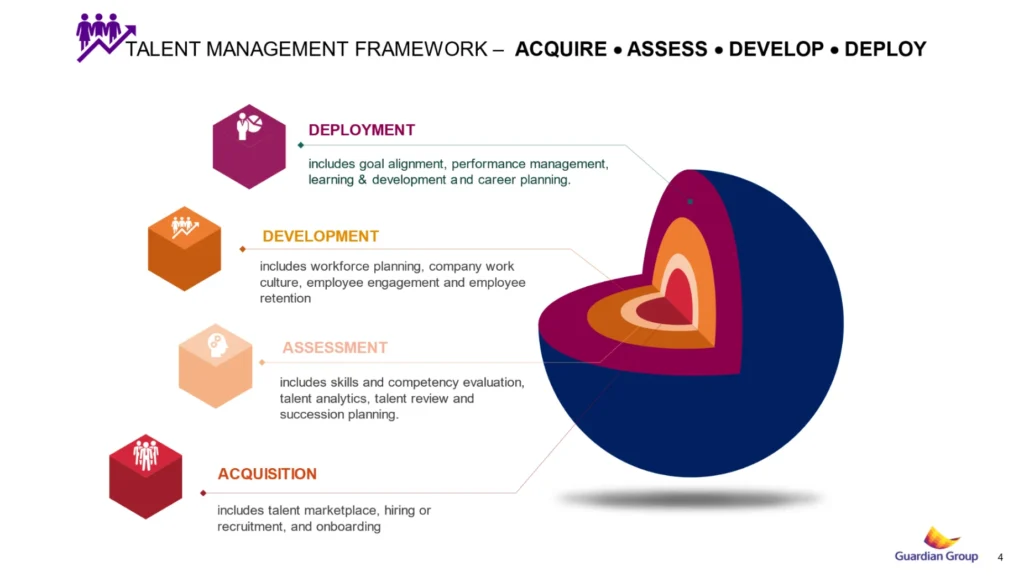
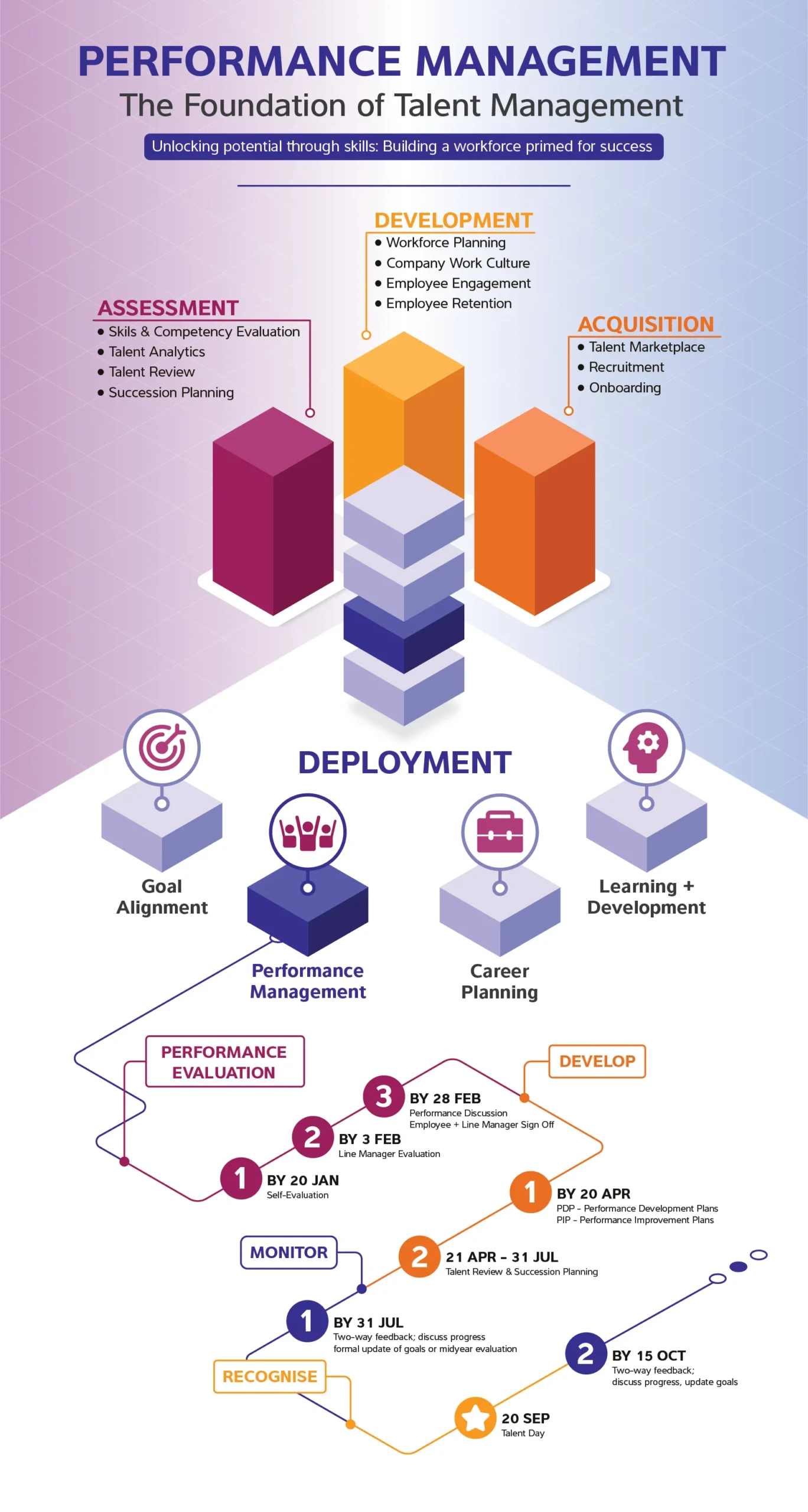
Original 3 Diagrams
Slide 01
Talent Management
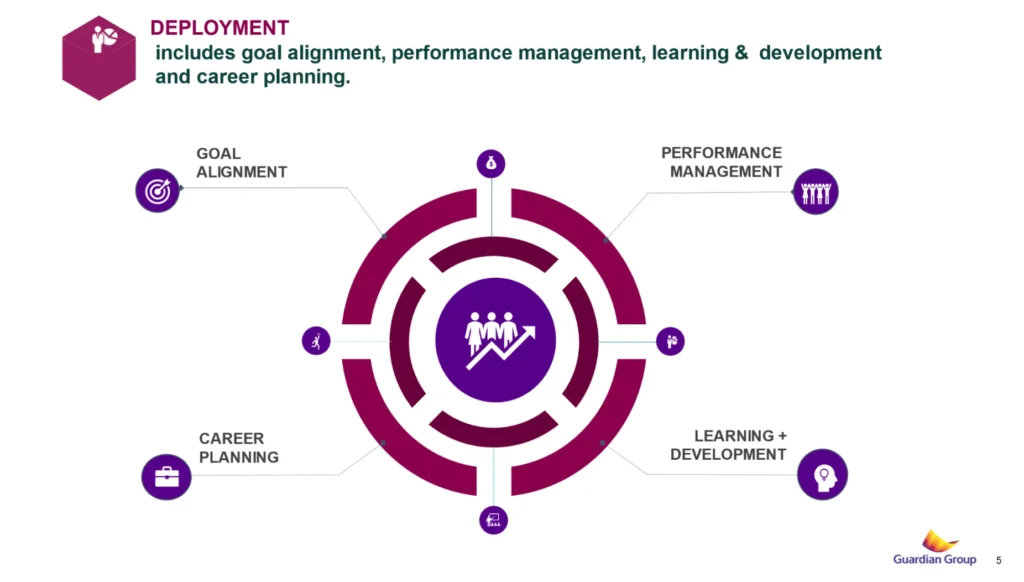
Slide 02
Deployment's key elements
Slide 03
Performance Timeline
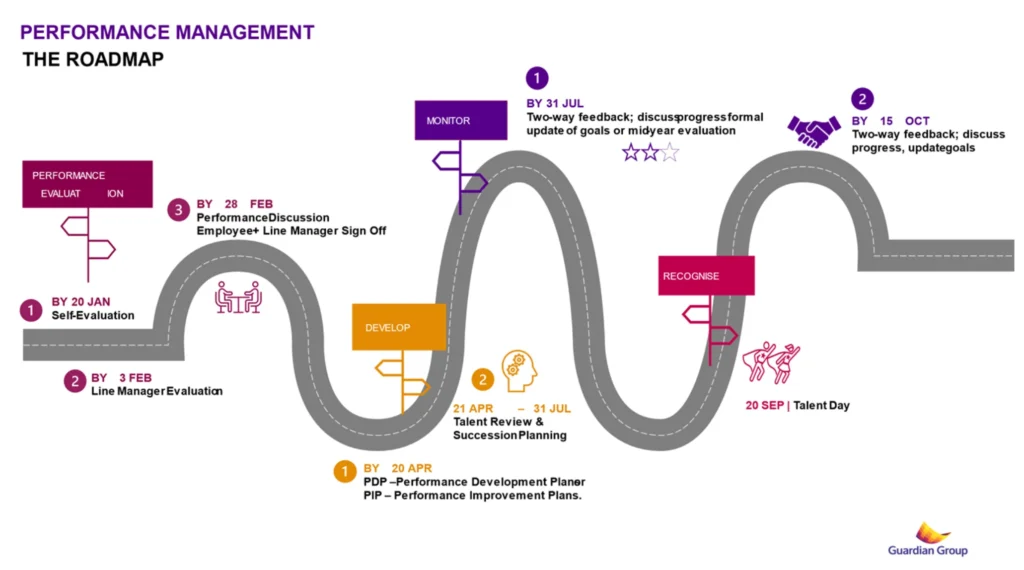
Master Roadmap
The same approval step, as written and as shown. The written version is accurate. What it doesn’t carry is what an experienced person checks before committing, or where the line sits between an acceptable shortcut and one that breaks the process two steps downstream.
Where this isn’t the right answer
If the job is mostly facts and thresholds to look up, a well-structured document beats animation at a fraction of the cost. That is a document we can build, and we will say so in scoping rather than sell you a video.
This work earns its cost when many people have to perform the same workflow correctly, and the difference between correct and almost correct isn’t obvious until it causes a problem downstream.
What makes the first week different
Every other kind of training competes with something. People already have a way of doing the task, and the training is asking them to change it.
Onboarding doesn’t have that problem, and that is exactly why it is easy to get wrong. There is nothing to overwrite. Whatever a new hire sees first becomes the reference point, and they will not know enough to tell whether it was the right one.
Which means sequencing carries more weight here than anywhere else. What they see in week one, in what order, and whether it shows correct execution or merely describes it, decides the habit that everything else gets built on top of.
If the process itself is contested, that is a different problem and it has to be settled first. SOP and workflow training
We design for the case where the correctness is already known, and the job is to transmit it before anything else gets there.
No prior habit to overwrite
A new hire starts blank
We design this
The first version they see becomes the reference
The can't tell if it was the right one
Nothing to compare it to
Week one shows correct execution, not a description of it
Nothing in week one is a correction. Everything in week one is a first impression, and first impressions set.
Where your new hires are getting stuck, and what to build for each case
The mechanism is the same in every team. Where it surfaces is not. New hires get stuck at different points, and the right approach depends on where the gap actually appears.
When new hires receive too much information in the first few weeks
Role-scoped sequencing (Content Structuring) | Modular onboarding sequences (Motion Graphic) | Progressive information design (Documents & Graphic Design)
Best suited for role-heavy onboarding, multi-system workplaces, and companies hiring in batches where everything arrives at once (tools, policies, product, team norms) and new hires retain very little of it.
When new hires learn their tasks but not how their role connects to everything else
Best suited for cross-functional roles, handoff-heavy operations, and teams where a new person can complete their own step correctly and still break the process downstream because nobody showed them what happens before and after them.
When new hires know the steps but hesitate the first time it happens for real
Best suited for customer-facing roles, frontline operations, and any position where the first real situation rarely looks like the training example, and confidence, not information, is what’s missing.
When onboarding quality depends on who happens to be training that week
Best suited for distributed teams, multi-location operations, and high-turnover roles where onboarding is run by different managers each time and new hires end up with different versions of what “doing it right” means.
Selected example
One QBE: one version of the training, delivered to 14,500 employees across 37 countries
One QBE Insurance Group is among the world’s twenty largest general insurance and reinsurance companies. Their problem wasn’t a missing course. It was that a course delivered across dozens of countries stops being one course. Each location interprets it, adapts it, and after a while the same role is being trained differently depending on where someone sits.
They needed a single version every employee could reach, working the same way everywhere.
We built the training as animation, with the visual approach adapted to how QBE actually works: a formal register, real workplace scenarios, and their brand guideline rebuilt for motion rather than applied on top of it.
14,500 employees engaged with the course
Across 37 countries
One QBE was role-based training for an existing workforce, not new-hire onboarding. We’re showing it here because the problem it solved is the first problem onboarding runs into: one role, one definition of correct, regardless of who delivers the training.

What you actually receive: four onboarding formats F.Learning builds
We turn role knowledge, workflows, and tool usage into clear, replayable learning media that new hires can apply immediately, and return to during real work when they need a reference.
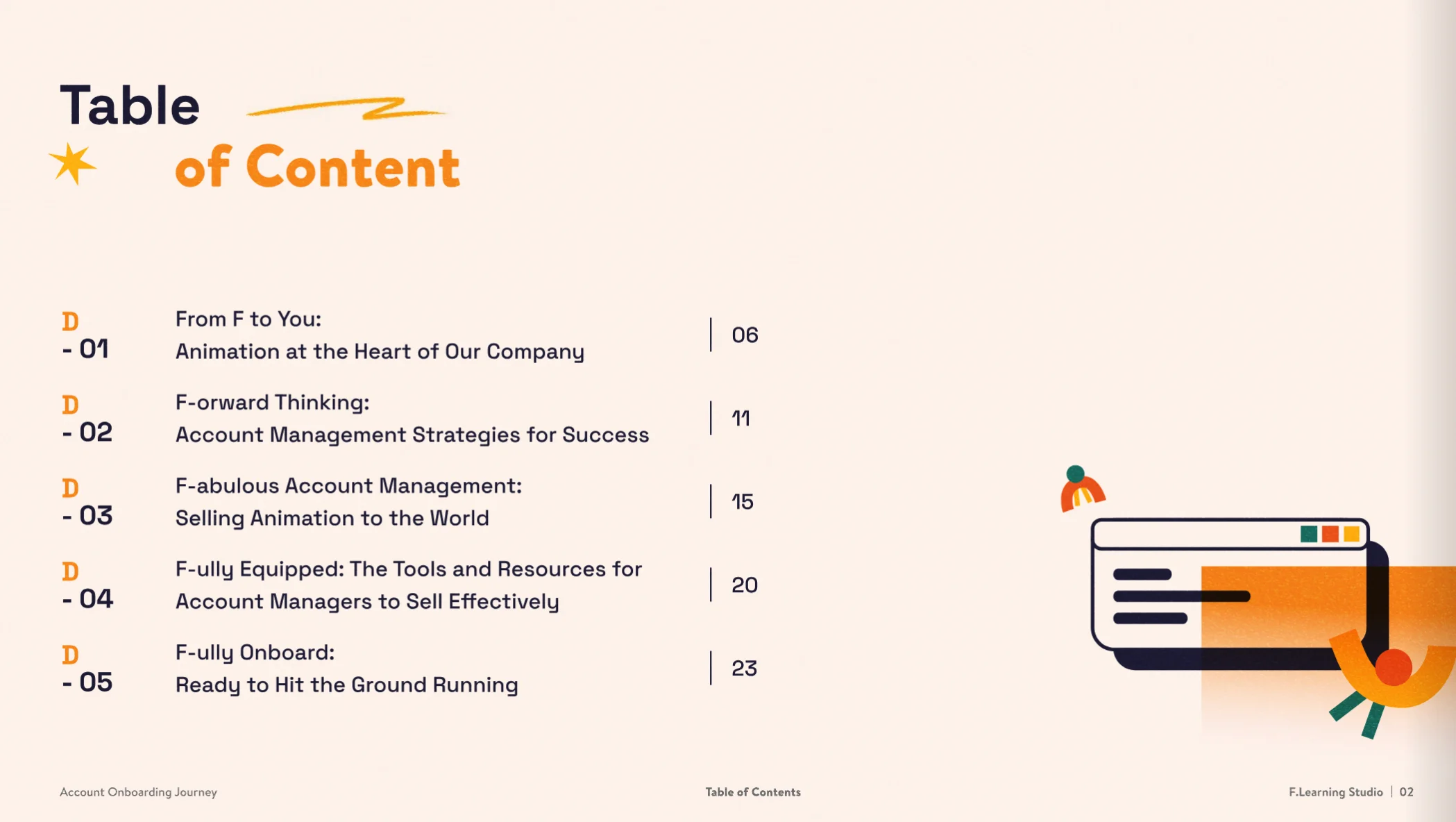
Week one only. Everything else was deliberately moved out.
Role-Based Content Structuring & Quick-Start Mapping
We define what new hires need in the first 30/60 days, not the complete job description, and sequence it around the workflows and decisions that determine early performance.
Quick-Start Onboarding Animation
Short visual walkthroughs of key workflows, role expectations, and common early mistakes, built to be rewatched when something comes up in real work. The goal is making correct performance visible, not just describable.
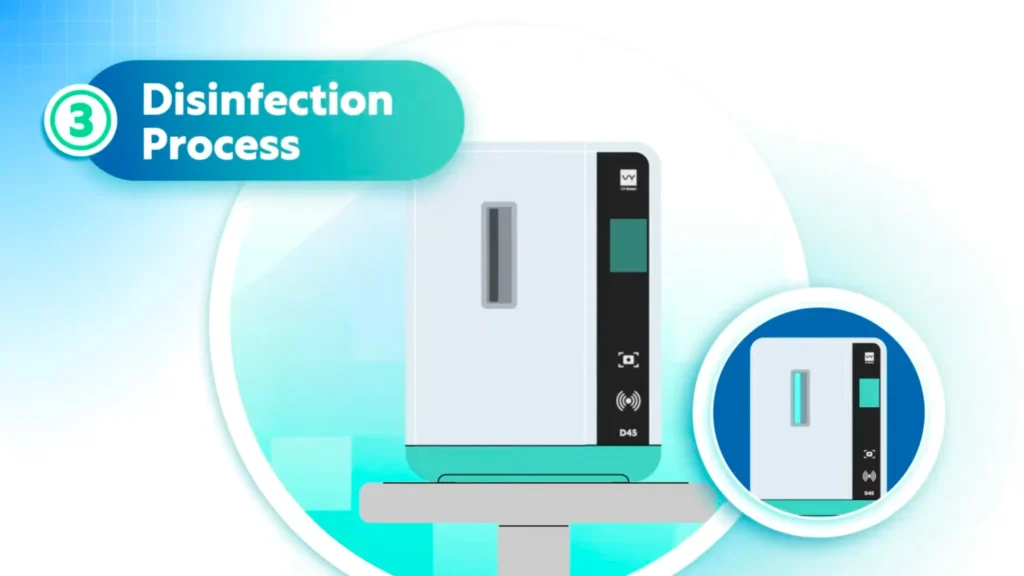
This step is split in two because new hires consistently merge them and skip the verification.
The wrong option here is the one new hires pick most often in real work. It’s in the exercise on purpose.
Interactive Guided Practice
Short scenarios and decision checks so new hires practise correct choices before they meet the situation for real, building the habit rather than hoping it follows from knowledge.
Visual Job Aids & Reference Materials
Quick reference guides, visual SOPs, and checklists designed for use during the task, not during the training session. Onboarding that leaves no reference tools requires re-onboarding.
Sized for the second monitor, not for printing. This gets used during the task, not before it.
How F.Learning builds onboarding training: Four steps, 4–6 weeks, and what we need from your team
Step 1
Map what the role needs from day one
We work with hiring managers, team leads, and experienced role holders to identify what new hires actually need to do correctly in the first 30/60 days: not everything eventually, but specifically what matters now.
What this step covers
- The workflows that new hires will encounter immediately
- The decisions they'll face before they fully understand the role
- The performance expectations for the first weeks that aren't written anywhere
- What "doing it right" looks like in practice, not just on paper
Step 2
Surface tribal knowledge and define correct
The most important onboarding knowledge usually exists in experienced team members’ heads, not in documentation. We work with SMEs and team leads to extract and define it.
What this step covers
- The specific steps that experienced staff do instinctively but never explain
- The nuances that separate acceptable execution from excellent execution
- The context and reasoning behind procedures that aren't obvious from the steps alone
- The situations where "it depends" and what it actually depends on
Step 3
Design for replay and real-work reference
Onboarding content gets consumed once during orientation and then needs to be accessible during real work, when a new hire encounters a situation they half-remember from training. We design for this from the start.
What this step covers
- Short, searchable modules that can be rewatched when needed
- Visual job aids and reference materials designed for in-workflow use
- Structure that allows new hires to find the specific answer they need, not re-watch everything
Step 4
Identify and address common early mistakes
Managers often have different assumptions about what new hires get wrong than what actually happens. We identify the real early mistakes, the ones that come from unclear guidance rather than lack of effort, and build them explicitly into the training.
What this step covers
- The workarounds that new hires create when they don't know the correct approach
- The steps that get skipped because their importance isn't obvious
- The situations where new hires default to previous-job habits that don't apply here
Related insight







Related services & solutions
Related Training Solutions
Related Services
Frequently asked questions
What types of onboarding training does F.Learning support?
New hire onboarding, role-specific quick-start training, tool and process adoption, organizational or strategy rollouts, and any context where the goal is getting people to correct performance faster and more consistently than current onboarding achieves.
How is visual onboarding different from a standard onboarding document or handbook?
That library was written for the average patient with your procedure, not for the protocol your unit actually follows. If the two say the same thing, you don't need us. In our experience they don't - the difference shows up exactly where it matters, in the specific instruction a patient has to act on at home.
How do you capture knowledge from experienced team members who "just know" how to do things?
Through structured conversations with SMEs and team leads, focused specifically on the steps that experts do instinctively and rarely articulate. We look for the nuances, the reasoning behind procedures, and the situations where informal judgment is applied, and convert these into content that new hires can access from day one.
Can onboarding content be reused when roles or processes change?
Yes. We design with update cycles in mind, using modular content structures that allow specific sections to be revised when workflows change without rebuilding everything from scratch.
How long does an onboarding training project typically take?
A focused role-based onboarding module typically runs 4–6 weeks depending on role complexity, the number of workflows covered, and how much tribal knowledge needs to be surfaced and structured before production can begin.
How much time will this take from our team?
For a typical onboarding or role-based training project, your SME or team lead usually needs to contribute around 3-5 hours in total, spread across the project. Most of that time is spent upfront: 1-2 hours to walk us through the role, workflow, and existing materials. After that, expect around 1-2 hours to review the learning structure and content, plus 30-60 minutes for final checks and approval. We handle the structuring, design, and production in between, so your team's role is mainly to provide the right context and confirm accuracy at key stages.
What does an onboarding project cost?
A focused onboarding or role-based training project typically starts from around $3,000, while broader programs covering multiple workflows, roles, or learning formats can cost more. The final cost depends on how much content needs restructuring and whether the solution includes animation, interactive practice, job aids, or a combination of formats. We usually recommend starting with the smallest useful version around one role or workflow, then scaling based on what works.
For context, companies can spend 3,000-5,000 per employee on onboarding professional roles when the wider costs of training, manager time, tools, and lost productivity are included. A well-designed training system is only one part of that investment. For animation specifically, you can also use our Animation Cost Calculator for an initial ballpark.
Does this work with our LMS?
Yes. We can prepare training for common LMS delivery formats, including SCORM packages (common formats such as SCORM 1.2 and SCORM 2004), MP4, or embedded modules. Tell us which LMS you're using during scoping so we can confirm the right delivery format before production begins.
Is the content accessible?
Accessibility requirements can be built into the project from the start, including captions and other supporting formats where needed. If your organization works to a specific accessibility or WCAG standard, let us know during scoping so the required level can be confirmed before production.
Can we get this in other languages?
Yes. Onboarding content can be localized for multi-language rollouts, including regional versions where different teams need the same training in different languages. It helps to plan localization before production so narration, on-screen text, layouts, and reusable assets are designed with those versions in mind.
Who owns the files after delivery?
You own the final video or project delivered to you and can use it as agreed for your organization. The underlying production materials - such as artwork, illustrations, storyboards, audio assets, and working files - remain the intellectual property of F.Learning Studio. If your team needs the editable source files for future updates or internal reuse, they can be included for an additional 10-30% of the project fee, depending on the project and files required. We’ll confirm what’s included before production begins, so there are no surprises at handover.

Pick the one role where new hires take longest to become independent, and we'll look at that role with you: what they need in the first two weeks, what's already working, and whether this is even a media problem. If it isn't, we'll say so.
30 minutes with a learning designer. No deck required.