
SOP and workflow animation for teams running different versions of the same process
You’ll talk to a learning designer about one specific process. We’ll tell you if it’s a process problem before it’s a training problem.
Most procedures are already documented. The challenge is that the documented version and the version teams actually follow have quietly drifted apart, and training built from an outdated document just teaches the wrong thing more clearly.
Built for operations and transformation leads running the same process across shifts, sites, or teams.






The SOP still exists. It just stopped being the version people follow.
Most organizations have SOPs. The problem is rarely that procedures haven’t been written down.
The problem is what happens after the document is published. Workflows evolve, edge cases emerge that the SOP never anticipated, and teams quietly develop their own workaround version of “how we actually do this.” The written procedure stops matching the practiced one, and nobody updates the document, because nobody owns that gap.
In 1956 Armand Feigenbaum described a hidden plant operating inside every plant, consuming 15% to 40% of capacity on rework, repair, and redoing work that was done wrong. Seventy years on, the estimate hasn’t moved much, and neither has the reason it stays invisible: that capacity never appears on a production schedule. It shows up as overtime, as missed ship dates, and as machines that are always busy and never produce enough.
A process running two different ways across two shifts is one of the places that capacity goes.
The most common SOP failure isn’t a missing document. It’s a document that technically exists but has quietly stopped being the source of truth, replaced by whatever version of the process feels normal to whoever is doing the work that day.
What teams are still unsure about, even with a complete SOP library
- Which version of a process is actually correct, the documented one or the one a colleague showed them
- What to do in the specific edge cases the SOP doesn't cover
- Whether a shortcut that's become normal is actually acceptable or just unaddressed
- How their version of the workflow compares to what other teams, shifts, or locations are doing
What SOP training has to do, and whether rewriting the document, recording a senior operator, or a wiki page delivers it
This is rarely achieved by converting an existing SOP into a video. Five things decide whether a process actually runs the same way everywhere. Here is what each option does well, and where it runs out.
| F.Learning a reconciled process, then the formats it needs | A rewritten SOP doc | Filming a senior operator | A wiki or intranet page | Briefing at handover | |
|---|---|---|---|---|---|
| Clear which version is current? | Strong: reconciled and signed off before anything is produced | Partly: usually records one person's view | Weak: captures today's practice, including the drift | Weak: whoever edited last wins | Weak: whatever the lead believes |
| Covers the edge cases? | Strong: from the cases your teams hit | Weak: only what someone anticipated | Weak: only what happens while filming | Partly: if someone maintains it | Strong: a person answers the odd case |
| Same across shifts and sites? | Strong: one version, produced once | Partly: interpretation still varies | Weak: spreads one site's version | Partly: only if people read it | Weak: no |
| Easy to check mid-task? | Strong: built as a reference for the job | Partly: rarely usable mid-task | Weak: you scrub to find it | Strong: searchable, already where they work | Weak: not available then |
| Survives the next process change? | Partly: revise a section, not the whole | Partly: cheap to rewrite, hard to re-read | Weak: re-record everything | Strong: cheapest and fastest, but only if people read it | Partly: instant, and inconsistent |
| Best when | teams run different versions and it already costs you | you need one authoritative written record | you want today's practice captured exactly | the process changes constantly | the shift needs an answer right now |
👈 Swipe horizontally to view full table 👉
In short: A wiki is the cheapest to keep current and the easiest to search mid-task. A handover briefing is the only option that can answer the case nobody wrote down. F.Learning is strongest when the documented process and the practised one have separated and somebody has to reconcile them first, which is also the slowest and most expensive route.
Input
Output
Click image to see full infographic
The same procedure, as documented and as reconciled. The marked steps are where the written version and the practiced version had separated. Nobody had noticed, because each team only ever saw their own.
Where this isn’t the right answer
If the process is genuinely contested, that is a decision for someone with authority, not a training project, and we will tell you before anyone produces anything.
This work earns its cost when the correct version is knowable but scattered, and teams running different versions already shows up in rework, incidents, or audit findings.
Why we start from what people do, not from the document
Most SOP training treats the document as the source of truth and the training as a way to communicate it more clearly. We start from the opposite direction. What people actually do differs from what’s documented, and training that only reinforces the document teaches the wrong thing more clearly.
So the first deliverable isn’t training. It’s a reconciled version: a decision, signed off by the process owner, on which version is correct going forward. Sometimes that decision absorbs an improvement a team found on their own and nobody wrote down. Sometimes it closes drift that had started to create real risk.
Until that decision exists, any training we make just broadcasts one interpretation faster.
Documented version
Practiced version
We design this
Where they diverge and why
Mapped with the people who run it
Process owner decides
Your call, not ours
One version that training reinforces
Every process has a version on paper and a version that runs. This work starts by measuring the distance between them.
We focus specifically on
- Starting from observed practice, not the SOP document, to identify where the written process and the real workflow diverge before we design anything
- Making the reason behind each step visible so a step survives being adapted under pressure, not just followed when convenient
- Designing for the moment a shortcut becomes tempting, not just the moment someone reads the procedure
- Building one visual reference that holds across shifts and teams so "the way we do it" stops depending on who trained you
SOP & workflow training examples
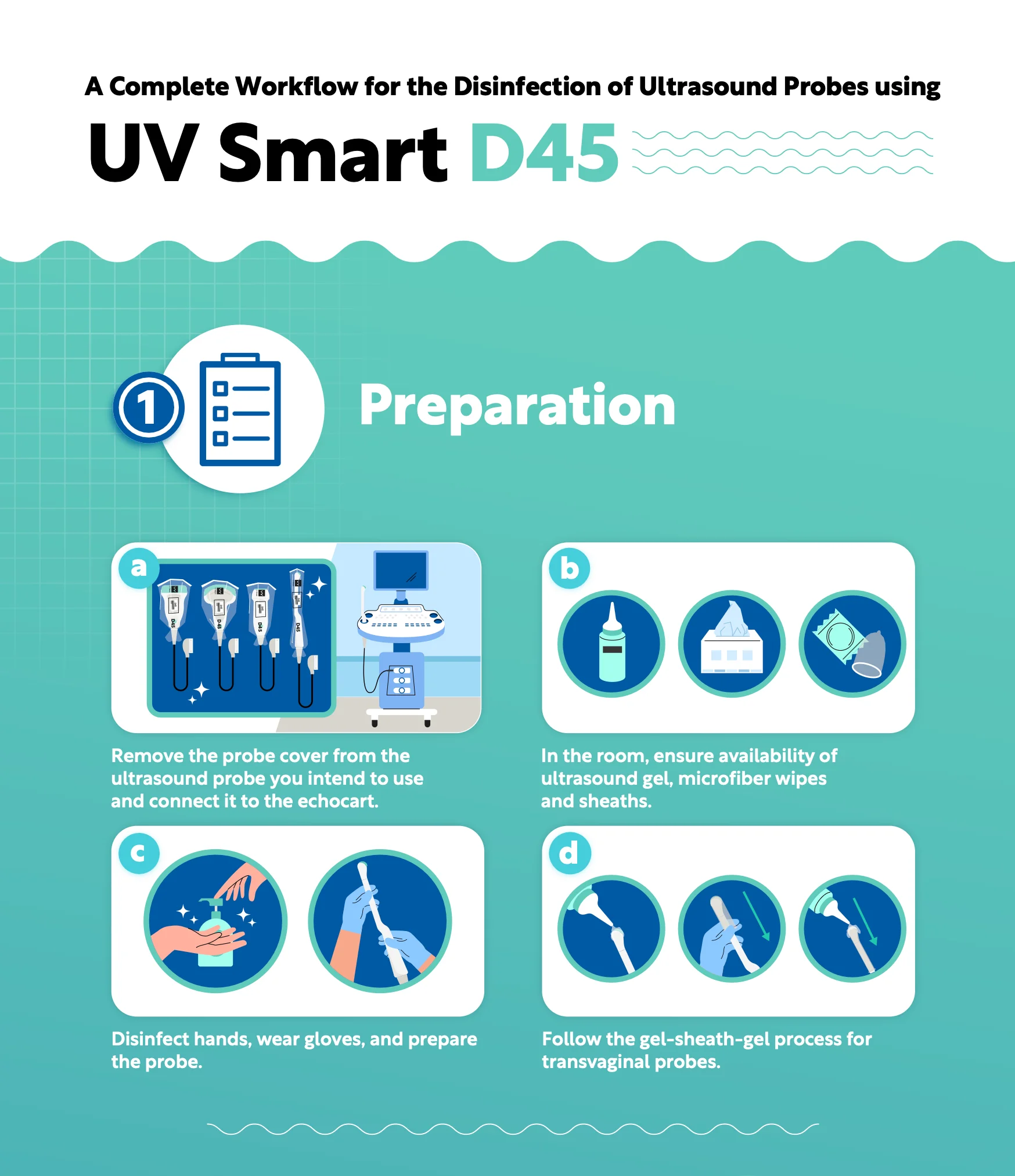
UV Smart: turning separate product instructions into one clinical workflow
UV Smart had clear product information for its D60 disinfection device and accessories, but the materials explained each component separately. ENT professionals still had to work out where each accessory belonged in the actual consultation sequence, from post-endoscopy handling and transport through pre-cleaning, disinfection, and storage.
We rebuilt the content around that workflow instead of the product catalog. The animation, infographic, reseller catalog, and supporting brochures all followed the same clinical sequence, introducing each component at the point where it is actually used.
Result
UV Smart received four connected assets built around one shared workflow for two audiences: ENT professionals and resellers. Instead of asking users to piece the process together from separate product information, the materials showed what happens, in what order, and where each part of the D60 system fits.
“F. Learning Studio helped us explain the D60 and its accessories with clarity and impact. Their visuals made it easier for healthcare professionals and resellers to understand the value of our product.”
Tommaso Allegri, Marketing Specialist at UV Smart
Need the same process followed consistently across teams? See compliance & process-driven training.
Where this applies
- SOP training: Rollout, updates, or an existing SOP that needs communicating more clearly than the document manages alone.
- Workflow training: Multi-step processes that cross roles, handoffs, and departments.
- Process change: Moving from an old process to a new one, including the habits that have to shift with it.
- Task & procedure: Specific tasks where equipment, sequencing, or precision matters.
- Operational excellence: Structured improvement methods and shared fluency in how the organization approaches process quality.
Specific applications in each area
- SOP: SOP explanation, rollout, updates
- Workflow: end-to-end process training, cross-functional workflow education, operational workflow training
- Process change: process improvement rollout, new process adoption, operational transformation
- Task & procedure: equipment operation, operational task training, procedure walkthroughs
- Operational excellence: Lean process training, Six Sigma awareness, continuous improvement

Where your process has drifted, and what to build for each case
Different SOP and workflow problems need different approaches. Where the drift shows up decides what to build.
When teams are inconsistently following the same process
Content structuring and process reconciliation (Content Structuring) | Workflow and procedural animation (Training & Education Animation) | Visual job aids and reference materials (Documents & Graphic Design)
Best suited for distributed teams, multi-shift operations, and processes where informal variations have emerged across locations or individuals.
When SOPs are outdated or no longer match real practice
SOP audit and gap mapping (Content Structuring) | Updated workflow animation (Training & Education Animation) | Revised reference documents (Documents & Graphic Design)
Best suited for organizations where the process has evolved faster than the documentation, or where the original SOP never accounted for common edge cases.
When a new process or workflow needs fast, consistent rollout
Interactive practice and walkthroughs (Interactive Learning Design) | Visual rollout assets (Documents & Graphic Design)
Best suited for new tool adoption, process redesigns, and organizational changes that require teams to switch from an old workflow to a new one quickly.
When teams need ongoing reference during real work
Interactive resources and job aids (Interactive Learning Design) | Documents and graphic design (Documents & Graphic Design) | Modular, searchable content (Content Structuring)
Best suited for distributed teams, multi-location operations, and high-turnover roles where onboarding is run by different managers each time and new hires end up with different versions of what “doing it right” means.
How F.Learning builds it: four steps, 4 to 7 weeks, starting with an audit you may not need us for
Step 1
Audit the gap between documented and practiced workflow
We compare the written SOP against what teams are actually doing, and decide whether this is a communication gap or a process gap that has to be resolved first.
What this step covers
- Interviews with process owners and frontline staff
- Direct observation of real workflow where possible
- Identification of where and why the documented and practiced versions diverge
- A determination of whether the problem is a communication gap or a process gap that needs resolving first
Step 2
Reconcile and define the current correct version
Where the documented and practiced versions conflict, we work with stakeholders to decide what’s correct going forward, and get it signed off.
What this step covers
- Incorporating legitimate workflow improvements teams have already found
- Correcting drift that has created real inconsistency or risk
- Getting sign-off from process owners on the single version training should reinforce
Step 3
Structure the workflow for visual explanation
The reconciled process is sequenced around how the work actually unfolds, rather than around the structure of the original document.
What this step covers
- Mapping decision points and handoffs
- Sequencing exception handling alongside the standard path
- Separating must-know steps from supporting context
Step 4
Design for ongoing reference and update cycles
Because workflows keep evolving, content is built modular from the start, and prepared for wherever it will actually live.
What this step covers
- Structuring sections so individual steps can be updated without a full rebuild
- Designing for use as a quick reference during real work, not just one-time training
- Preparing assets for the specific deployment environment: LMS, intranet, or printed job aid
Related insight
More on process consistency:





Related services & solutions
Related Training Solutions
Related Services
Frequently asked questions
What types of onboarding training does F.Learning support?
Standard operating procedure training, process and workflow rollouts, system or tool transition training, cross-team process alignment, and any context where the goal is consistent execution of a defined workflow across a team or organization.
What if our current SOP doesn't match how the work actually happens anymore?
This is one of the most common starting points. We audit the gap between the documented and practiced version before building any training content, because training built from an outdated SOP just produces a clearer version of the same inconsistency.
Can you work with processes that are still evolving or not fully finalized?
Yes. We design training content modularly, so specific sections can be updated as the process changes without rebuilding the entire asset from scratch.
How do you handle workflows that vary across teams, shifts, or locations?
How long does an SOP and workflow training project typically take?
Most projects take 4 to 7 weeks from kickoff to delivery, depending on the number of workflows covered and how many rounds of stakeholder review are needed.
How much time will this take from our team?
For a typical SOP or workflow training project, plan for around 6–10 hours of your team’s time, mostly upfront.
This usually includes 3-5 hours from the process owner to walk us through and validate the workflow, plus 2-3 hours across a small number of frontline staff for interviews or direct observation. After the workflow is agreed, your team typically needs another 1–2 hours for review and final approval.
F.Learning handles the structuring and production in between.
What does an SOP training project cost?
A custom SOP or workflow training module typically starts around 3,000-6,000 for a basic version, with mid-level interactive modules at 6,000-12,000, and complex simulations or multi-workflow programs going higher.
Final cost depends less on SOP length than on how much work is needed to align documented vs. actual practice, how many workflows are involved, and whether the solution uses animation, interactive practice, job aids, or a combination.
We normally start with one defined workflow and recommend the smallest useful solution. You can also use our Animation Cost Calculator for an initial ballpark.
Which LMS or intranet platforms do you deliver to?
We can prepare content for common LMS and internal learning environments such as Moodle, including SCORM 1.2 and SCORM 2004 packaging where required.
If your organization uses a different LMS or intranet, let us know your tracking, authentication, or file-format requirements during scoping so we can confirm the right delivery format before production begins.
Is the content accessible?
Who owns the files after delivery?

It's that the document and the daily reality stopped matching a while ago, and nobody has reconciled them since. Pick the process where that costs you most. We'll audit the gap first and tell you whether this is a training project at all.
30 minutes with a learning designer. We’ll say if it’s a process problem, not a training one.