Here’s how to transform your training and successfully shift from ILT to eLearning: stop thinking of it as a format swap. Simply recording lectures is why most digital conversions fail to improve skills or engagement.
A true transformation requires redesigning the learning experience itself. This guide provides the proven framework to create digital training that engages learners, improves retention, and delivers results. Keep reading!
Why Most ILT-to-eLearning Transitions Fail
Common Assumptions That Hold Back Success
Many L&D teams approach eLearning as a logistics problem: “Let’s record the session, upload the slides, and call it a day.” It feels efficient – but it overlooks a fundamental truth: digital learners behave differently.
Copy-pasting instructor-led content into a digital platform strips away interactivity, pacing, and human connection. Worse, it often assumes the same attention span and engagement in a completely different environment – one filled with notifications, multitasking, and limited patience.
The Cost of Copy-Paste Conversion
When content isn’t adapted for online learning, learners tune out. That leads to:
- ⬇️ Lower course completion rates
- ⬇️ Poor knowledge retention
- ⬆️ Increased support costs from undertrained staff
According to a Brandon Hall study, nearly 40% of digital learners abandon training halfway through when content feels irrelevant or boring. That’s not just bad learning – it’s a wasted investment.

Quick Snapshot: The Reality of Poor Transitions
| Problem | Impact on Learning |
| Uploading slide decks | Passive consumption → low engagement |
| Recorded lectures with no breaks | Cognitive overload → poor retention |
| No learner interaction or feedback | One-way delivery → no ownership or recall |
| No rethinking of visual delivery | Dense content → missed understanding |
💡 Decision-Making Takeaway: Treating eLearning as a format switch is a common trap – and an expensive one. If you want your digital training to actually work, you need to start with how people learn, not just how content is delivered. That mindset shift is where transformation begins.
Read more: 13 Great Benefits of Online Learning: The Future of Learning
The Mindset Shift: ILT ≠ eLearning
It’s Not Just Delivery – It’s How People Learn
Instructor-led training (ILT) thrives on human dynamics – facial expressions, real-time Q&A, group energy. But once you move online, those signals disappear. Learners aren’t in a classroom; they’re in their browser tabs, juggling work, emails, and distractions.
Yet many companies try to replicate ILT one-to-one – same pacing, same slides, same talk-heavy format. What they miss is that online learning requires structure, simplicity, and visual cues to guide understanding without a live instructor present.
eLearning isn’t about replicating the classroom. It’s about reimagining the experience for how people actually absorb content online.
What Today’s Learners Expect in Digital Environments
Modern learners – especially remote or hybrid workers – are used to intuitive platforms, short-form media, and self-paced discovery. They expect:
- Chunked content they can complete in 5-10 minute bursts
- Visual explanations that clarify complex topics quickly
- Moments of interaction (quizzes, prompts, decision points)
- Optional depth: the ability to skim or dive deeper
Give them a 60-minute video with zero control or interaction, and you’ll lose them by minute 12.
ILT vs. eLearning Learning Environment
| Aspect | ILT (In-Person) | eLearning (Digital) |
| Attention span | Managed by facilitator | Self-managed, shorter bursts |
| Learner interaction | Verbal, spontaneous | Designed prompts, quizzes |
| Visual focus | Trainer, board, slides | Screen-only (requires design clarity) |
| Flexibility | Fixed time/location | On-demand, mobile-compatible |
| Feedback loop | Real-time Q&A | Built-in self-checks or forums |
💡Decision-Making Takeaway: eLearning isn’t less than ILT – it’s just different. To make it work, you must redesign the learning experience, not just digitize the materials. That shift – from content delivery to learner design – is what separates forgettable courses from training that sticks.
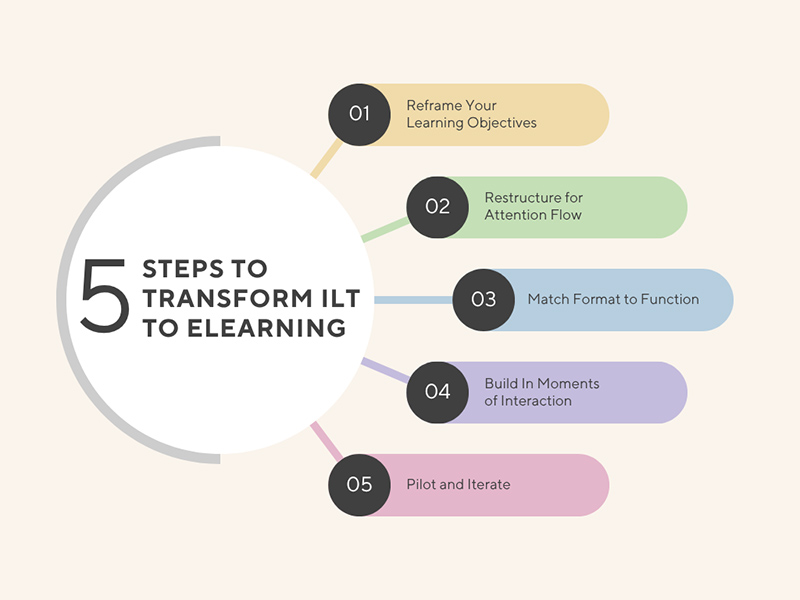
5 Essential Steps to Successfully Transform ILT into eLearning
Shifting from ILT to eLearning isn’t about digital translation – it’s a design transformation. At F.Learning Studio, we’ve helped dozens of L&D teams reimagine their training from the ground up. These five steps are the difference between an “uploaded course” and an upgraded learning experience.
Step 1: Reframe Your Learning Objectives – Not Just the Format
Don’t ask: “How do I move this 3-hour workshop online?”
Ask: “What do learners need to do differently after this course?”
In ILT, trainers often fill time. In eLearning, every second competes with distractions. So you must reframe objectives to be behavior-focused, measurable, and modular.
Our Pro Tip: We map every objective to one visual moment – “What does this idea look like when it clicks?” That keeps content focused and simplifies storyboard design later on.
Step 2: Restructure for Attention Flow – Not Chronology
ILT content usually follows a linear flow: intro → theory → practice.
eLearning must follow attention flow: hook → clarity → interaction → reflection.
We break content into micro-modules (5–7 minutes each), each designed to answer one core learner question. This makes training bingeable, skimmable, and repeatable – like great UX.
Our Pro Tip: In one project, we restructured a dense policy course into “Top 5 Scenarios to Avoid Legal Trouble” – same content, better engagement. Structure sells.
Step 3: Match Format to Function – Not to Habit
Just because you had a trainer say it out loud doesn’t mean it should be a talking-head video.
- Use animation to visualize abstract concepts, processes, or emotional nuances
- Use interactive questions to replace classroom discussions
- Use quizzes, sliders, drag-and-drop to deepen retention
Our Pro Tip: For emotional topics like DEI or harassment, we often use character-led animation – not just for visual appeal, but to build psychological safety and empathy in ways text can’t.
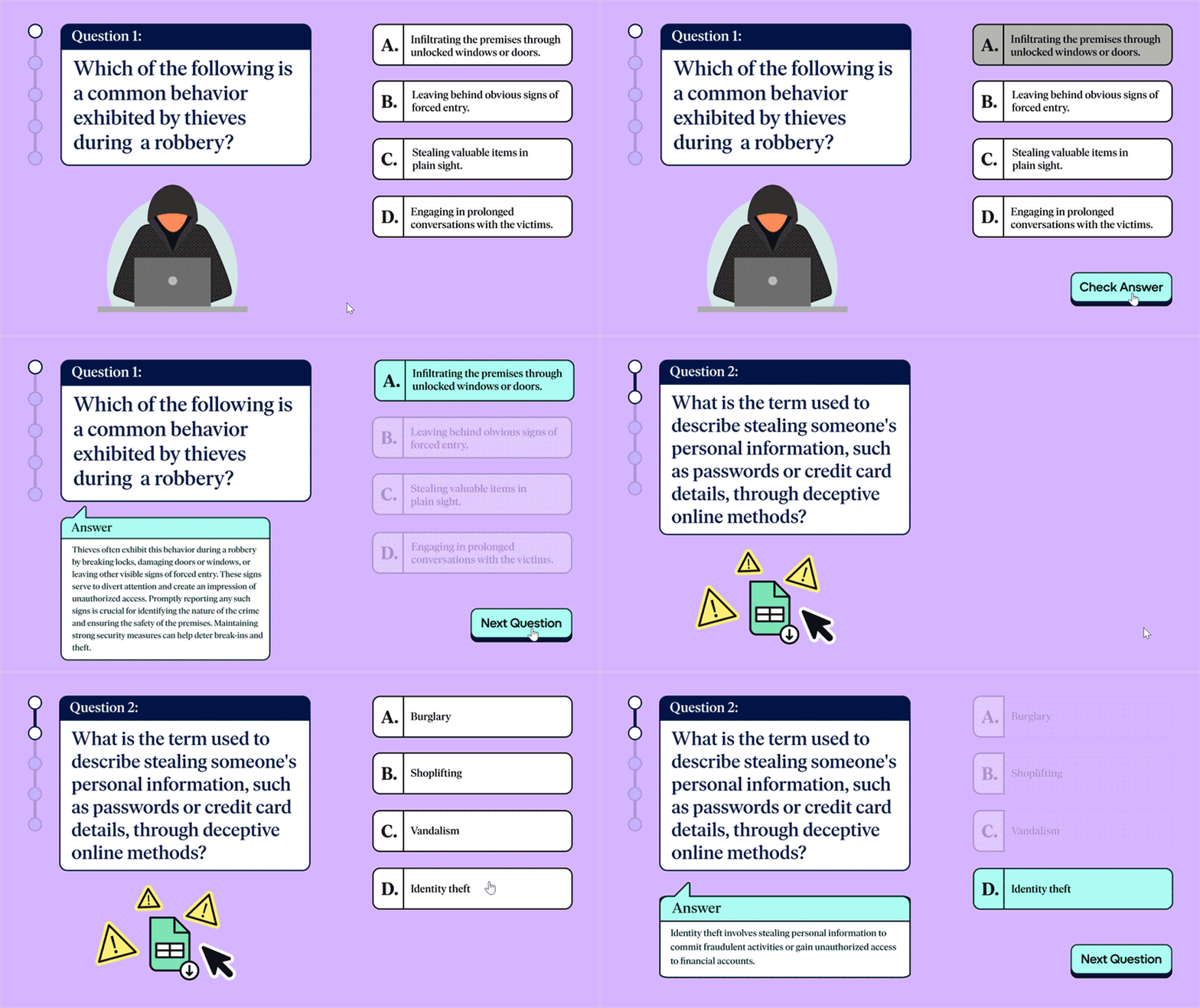
Step 4: Build In Moments of Interaction – Early and Often
In live sessions, people can raise a hand. Online? You have to design that hand-raise.
We embed learner interaction every 90 seconds:
- “What would you do in this case?”
- “Drag the right step into the right order”
- “Compare before/after results visually”
It’s not just engagement – it’s active cognitive rehearsal, which boosts retention by 2x compared to passive watching.
Our Pro Tip: Use interactive moments to simulate pressure or reflection, not just check boxes. The best eLearning makes learners think before they act.
Step 5: Pilot and Iterate – Design is Never One-and-Done
You wouldn’t roll out a new product without testing. Your training is no different. We always start with a pilot group, track how they navigate the course, where they click away, and what they replay. From there, we refine pacing, visuals, and wording for final production.
Our Pro Tip: One client learned their learners never clicked “additional reading” – so we folded essential takeaways into animated scenes instead. Form follows behavior, not assumption.
Final Takeaway: Transforming ILT to eLearning isn’t about compressing – it’s about clarifying. The goal isn’t to fit more into less time – it’s to make every second more learnable. With the right structure, visuals, and behavior-first thinking, your training becomes something people not only finish – but remember.
Real-World Example: From Classroom to Clicks – Guardian Group’s HR Training Reinvented
The Challenge: Explaining a Strategic HR Vision to a Distributed Team
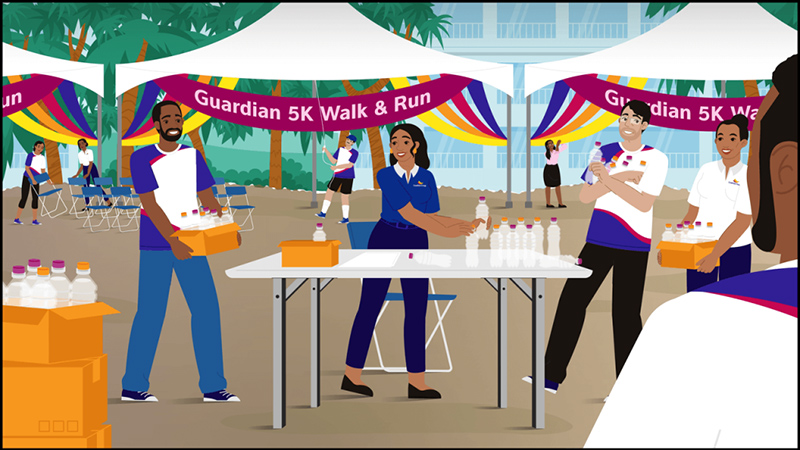
Guardian Group, a leading insurance provider in the Caribbean, needed to roll out a new HR strategy to over 2,000 employees. Traditionally, this type of change was handled through town halls and slide presentations – classic ILT formats.
But the message was complex:
- Multiple HR pillars
- New behaviors expected from staff
- Vision alignment across departments and countries
They couldn’t afford confusion – but the traditional format lacked clarity, consistency, and reach. They needed to shift to eLearning – fast, and with impact.
The Solution: From Passive Presentation to Visual Storytelling
We partnered with Guardian to turn a static HR deck into a dynamic learning experience. But we didn’t just animate the slides – we restructured the content for digital behavior.
Here’s how we transformed it:
| ILT Component | Our eLearning Upgrade |
| HR team explaining slides live | Narrated animated video with clear visual metaphors |
| Dense text and bullets | Simplified story arc with character-based storytelling |
| Strategy pillars described verbally | Each pillar visually broken down as part of a journey |
| One-time session | On-demand, replayable training shared across all regions |
We used a character-led approach to guide learners through the new strategy – turning abstract HR principles into a relatable narrative of change and growth.
Why Visual Choices Mattered
Instead of charts and jargon, we created:
- A “Map of the Future Workplace” as the main visual metaphor
- A warm, inclusive color palette to reflect Guardian’s values
- Slow-paced animations to ensure learners didn’t feel rushed
- Subtle sound design to enhance focus, not distract
These weren’t aesthetic choices – they were learning design choices. The goal was to reduce cognitive load, enhance retention, and give employees a shared mental model of the strategy.
The Outcome: Clarity, Consistency, and Confidence
After launch, the HR team reported:
- Higher learner confidence in understanding the strategy
- Improved internal alignment across regional offices
- Better recall during team check-ins and retrospectives
The video became more than just training – it became a reference tool for teams to revisit and reflect on during strategic planning sessions.
The Guardian didn’t just move online. They moved forward.
When to Use Animation to Boost Learning Outcomes
❗❗Spoiler: It’s not just to make things “look good”)
Animation isn’t a style choice – it’s a learning design tool. Used well, it doesn’t just enhance your training. It transforms it. At F. Learning Studio, we don’t add animation for flair. We use it where it solves real cognitive, emotional, or behavioral learning challenges.
Here’s when animation actually outperforms static visuals, talking heads, or slides – and why your eLearning strategy should take it seriously.
| ✅ When to Use Animation | Example | Why It Works |
| When Concepts Are Complex, Abstract, or InvisibleExplaining things like data privacy, emotional intelligence, or supply chain risk that aren’t physical objects. | We once used a “digital shield” metaphor to explain GDPR rights – a visual that stuck far better than policy text. | The brain processes visuals 60,000x faster than text. Animation turns abstract ideas into metaphors, motion, and cause-effect chains learners can grasp in seconds. |
| When You Need to Teach Judgment, Not Just FactsFor soft skills like leadership, ethics, and communication requiring emotional cues and reflection. | In one DEI course, we used character animation to portray a subtle microaggression – helping learners feel its impact without singling anyone out. | Learners engage deeper when they see themselves in the story. Animation allows for safer, more inclusive, nuanced storytelling. |
| When Learners Need a Shared Mental ModelFor new strategies or processes requiring cross-team alignment and shared understanding. | For Guardian Group, we visualized their HR strategy as a journey through “The Future Workplace” – a metaphor everyone could remember. | Visual metaphors connect the dots faster and improve long-term recall – weeks later, not just minutes after. |
| When You Want to Reduce Learning AnxietyFor sensitive topics like mental health, compliance, or harassment that trigger resistance. | We helped a dental anesthesia brand teach sedation safety for kids with autism using a friendly animated character. | Animation creates a safe emotional space for tough conversations – softening tone while keeping the message clear and impactful. |
| When You Want Scalable, Evergreen, High-Impact LearningFor content that needs to stay fresh and relevant over time. | For a global healthcare client, we developed an animated training series on infection control. It replaced live workshops in 7 countries, saved trainer hours, and was easily adapted into 4 languages. | Animation is evergreen by design – reusable, localizable, and efficient, especially when paired with modular learning design. |
Need Help!
To choose the right animation style?
Chat with us or schedule a free consultation Today!
Common Mistakes to Avoid in Your ILT-to-eLearning Transition
Even smart teams fall into these traps – here’s how to stay ahead.
Shifting from ILT to eLearning feels straightforward: take what worked in person, digitize it, and move on. But most failed transitions come from false equivalence – assuming what worked in the room will work on the screen.
We’ve helped dozens of L&D leaders avoid costly missteps. Here are three common traps – and smarter ways forward.
Mistake 1: Treating eLearning as a Tech Project, Not a Learning Experience
Too many teams start with the question: “Which tool should we use?” – instead of “What do our learners need to understand, feel, and do?” Yes, LMS features matter. But no platform fixes bad learning design. If your content is too long, too static, or too unclear, even the best platform won’t save it.
💡What to do instead: Start with your learning outcomes. Then map your content to experiences that achieve those goals – using the right combination of storytelling, visuals, and interactivity.
Our Valuable Insight: In one project, a client chose their LMS before designing content. Their “interactive” module turned into 30 static slides with click-next fatigue. We helped rework it into 3 short, scenario-driven animations – learner feedback and completion rates soared.
Mistake 2: Not Involving Learners Early Enough
You wouldn’t launch a new product without user feedback. But many teams skip pilot testing and go straight to rollout – only to discover that what made sense to the training team confused or disengaged real learners.
💡 What to do instead: Pilot before you publish. Let 5–10 learners test early drafts. Watch where they drop off, ask questions, or hesitate. That’s your goldmine for improvement.
Our Valuable Insight: In a compliance course redesign, pilot users kept skipping the legal definitions section. Instead of forcing them through, we turned it into a “Do or Don’t” decision game – legal understanding improved without heavy reading.
Mistake 3: Ignoring the Power of Visual and UX Design
In ILT, a charismatic trainer can carry dry slides. Online, the visuals and structure are the trainer. If your course is cluttered, text-heavy, or visually inconsistent, learners will disengage – even if the content is good.
💡 What to do instead: Design with visual hierarchy and pacing in mind. Use animation, iconography, and layout to guide attention, reduce overload, and support memory.
Our Valuable Insight: In one leadership training, we used animated scenes to contrast two meeting styles – one collaborative, one top-down. The animation made the abstract concept of “psychological safety” instantly clear, where bullet points never could.
Final Takeaway: Avoiding these mistakes isn’t about perfection – it’s about intentional learning design. The smartest L&D teams focus less on content delivery and more on learner transformation. That’s where the real ROI of eLearning lives – and that’s where we help you stand out.
Turn Your Training into Something People Remember – and Act On
Most ILT-to-eLearning transitions fail because they focus on moving materials. But the real challenge is moving minds. That’s where F.Learning Studio comes in – not just as an animation provider, but as a learning design partner who helps you reimagine how training actually works.
Whether you’re updating onboarding, compliance, leadership, or soft skills training – our team blends instructional design, visual storytelling, and learner psychology to make your message stick.
Why Clients Choose Us
We don’t just “make content digital.” We:
- Decode your learning goals and map them to engaging experiences
- Turn dry decks into emotionally resonant narratives
- Use animation strategically – to explain, to humanize, to persuade
- Support you from idea to implementation – scripting, storyboarding, visuals, delivery
- Partner with your team – whether you’re training 50 employees or 5,000+
You bring the subject matter. We bring it to life.
Ask your questions now & get answered
within 12 hours!
Flexible Formats. Real Results. Built for Scale.
From short animated modules to full learning journeys, we tailor each solution to your goals, audience, and delivery platform. We’ve helped clients:
- Increase training completion rates by up to 50%
- Improve concept recall through visual metaphor design
- Save hours of facilitation time through evergreen, on-demand content
- Localize and scale programs across regions, languages, and cultures
Your training doesn’t just need to be online. It needs to be unforgettable.
Final Thoughts
Moving from in-person training to eLearning isn’t just about switching formats – it’s about transforming how people learn, engage, and grow. Throughout this article, we’ve explored what makes that shift succeed: learner-first design, smart visuals, and content built to stick. If you’re thinking, “This feels bigger than I can handle alone” – that’s exactly why we’re here.
At F.Learning Studio, we turn complex, clunky ILT into learning experiences your team will actually want to finish. Let’s make it unforgettable. Book a free consultation – and let’s get your transformation started!
Or contact us via:
- Email: [email protected]
- Fanpage: https://www.facebook.com/f.learningstudio
- Website: https://flearningstudio.com/
- LinkedIn: https://www.linkedin.com/company/f-learning-studio/
Get the best values
for your project
See how much your project might cost at F.Learning Studio!
Don’t stop here – keep reading to get more valuable insights:
- 3 Virtual Employee Engagement Ideas that Work in 2026
- eLearning Course Development: 8 Must-Know Steps in 2026
- Top 7 Explainer Video Script Writing Services for Your Project

Sean Bui, the founder and creative director of F. Learning Studio, is a respected leader in the e-learning and multimedia production industry.
With over 10 years of experience, he has dedicated his career to helping organizations create engaging and impactful learning experiences. Under his leadership, F.Learning Studio has grown into a trusted partner for organizations in the education, healthcare, and corporate training sectors, producing over 2,000 minutes of educational animation.
Sean’s expertise in translating complex concepts into compelling animated videos and interactive learning experiences, as well as his active involvement in the e-learning community, have earned him a reputation as a trusted partner and thought leader in the field of educational technology.